PUBG MOBILE 120 FPS Supported Devices (Official List 2026)
With the latest updates in PUBG Mobile, many high-end devices now support 120 FPS to deliver ultra-smooth gameplay and quicker responsiveness. In this guide, we share the official list of devices that support 120 FPS natively in PUBG Mobile, along with requirements, tips, and alternatives for unsupported phones.
What is 120 FPS?
120 FPS (Frames Per Second) means the game can display up to 120 frames every second — resulting in:
- Smoother animations and transitions
- Lower input delay and better aim control
- Reduced motion blur and more competitive play
To benefit fully from 120 FPS, your device must support:
Free · One App · Everything Unlocked
Unlock What PUBG Mobile Hides From You
120 FPS on unsupported devices, iPad View, no-recoil sensitivity codes — GFXTOOY gives you every hidden setting in one tap, no root needed.
- 120 FPS on non-supported devices
- iPad View — wider FOV, bigger screen
- No-recoil sensitivity codes built-in
- HD & Ultra graphics · 100% no ban
- A high refresh rate screen (120Hz)
- A capable GPU/CPU for stable rendering
✅ Official 120 FPS Supported Devices in PUBG Mobile (2026)
Here is the latest list of phones that officially support unlocked 120 FPS in PUBG Mobile:
📱 PUBG Mobile 120 FPS Supported Devices by Brand (2026)
| Brand | Supported Devices (120 FPS) | Chipset | Refresh Rate |
|---|---|---|---|
| Samsung |
Galaxy S23 / S23+ / S23 Ultra Galaxy S24 / S24+ / S24 Ultra |
Snapdragon 8 Gen 2 / Gen 3 | 120Hz |
| OnePlus |
OnePlus 11 OnePlus 12 OnePlus 12R |
Snapdragon 8 Gen 2 / Gen 3 | 120Hz |
| Xiaomi |
Xiaomi 13 / 13 Pro Xiaomi 14 Series Redmi K60 Pro Redmi K70 Pro |
Snapdragon 8 Gen 2 / Gen 3 | 120Hz |
| iQOO |
iQOO 11 iQOO 12 |
Snapdragon 8 Gen 2 / Gen 3 | 144Hz |
| ASUS (ROG) |
ROG Phone 6 ROG Phone 7 ROG Phone 8 |
Snapdragon 8+ Gen 1 / Gen 2 | 165Hz |
| RedMagic |
RedMagic 8 Pro RedMagic 9 Pro |
Snapdragon 8 Gen 2 / Gen 3 | 165Hz |
| Black Shark |
Black Shark 5 Pro Black Shark 6 Series |
Snapdragon 8 Gen 1 / Gen 2 | 144Hz |
| Vivo |
Vivo X90 / X90 Pro Vivo X100 Series |
Dimensity 9200 / 9300 | 120Hz |
| Realme |
Realme GT 2 Pro Realme GT 5 |
Snapdragon 8 Gen 1 / Gen 2 | 120Hz |
What Devices DO NOT Support 120 FPS?
Many phones do not support 120 FPS natively in PUBG Mobile — this includes:
- Devices with 60Hz displays
- Most mid-range or budget phones
- Older flagship devices from 2020–2021
Even if a game shows 120 FPS in settings, your device must also have:
- 120Hz refresh screen
- GPU capable of sustaining high FPS
🛠️ How to Check 120 FPS Support on Your Phone
- Open PUBG Mobile.
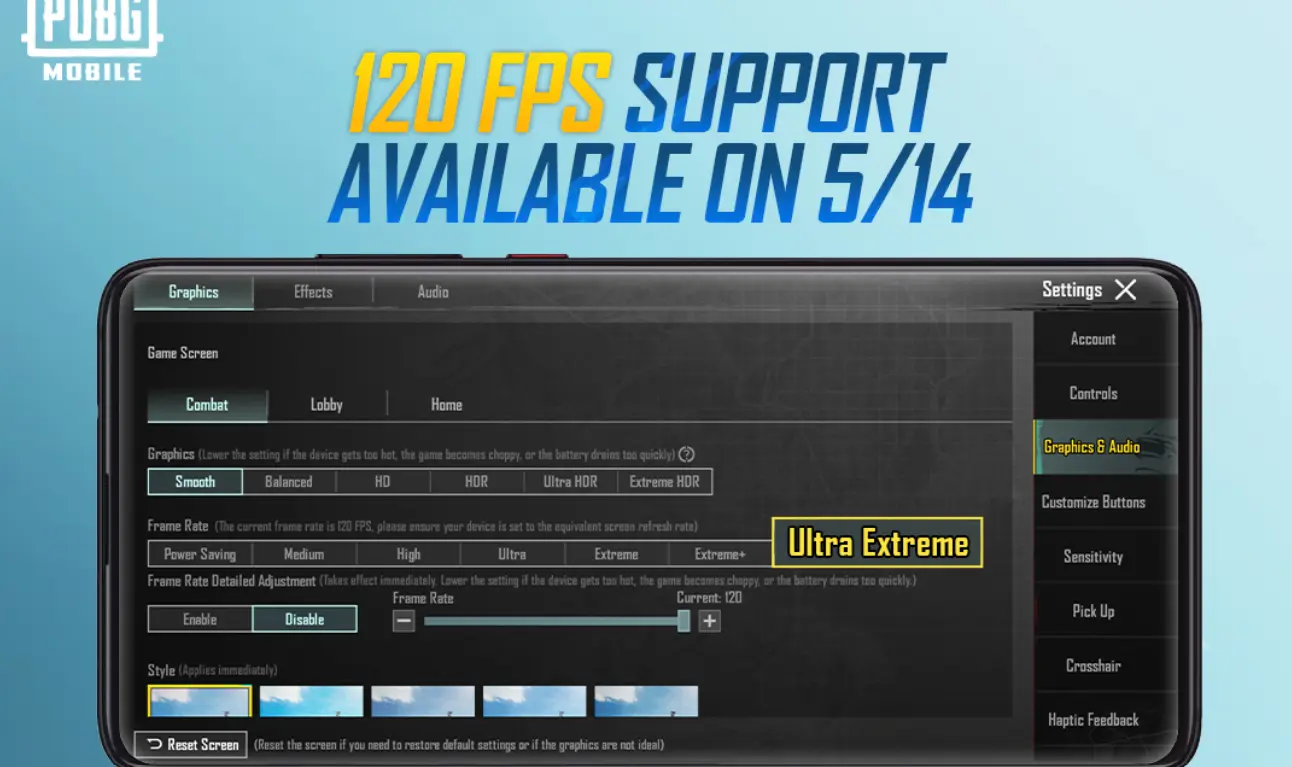
- Go to Settings → Graphics.
- Look for “120 FPS / Ultra Extreme” in Frame Rate.
- If available, select and apply.
If you don’t see it, your phone may not support it officially.
🔓 How to Unlock 120 FPS on Unsupported Devices
If your phone doesn’t officially support 120 FPS, you can still try boosting performance using tools like GFXTOOY. It allows many players to enable 120 FPS or improve smoothness even on unsupported devices.
👉 Unlock 120 FPS on ANY Device
This guide shows how to activate 120 FPS safely using Shizuku and the GFXTOOY tool.
Best Settings for 120 FPS in PUBG Mobile
- Graphics: Smooth
- Frame Rate: Ultra Extreme (120 FPS)
- Anti-Aliasing: Close / Off
- Shadows: Disabled
- Brightness: Manual
These settings reduce lag and help maintain stable FPS.
Benefits of Playing in 120 FPS
- Faster enemy detection
- Smoother camera movement
- Improved recoil control
- Better competitive advantage
Competitive players always prefer higher frame rates for quicker reactions and smoother battles.
FAQ – PUBG Mobile 120 FPS
Does a 120Hz screen guarantee 120 FPS?
No. A 120Hz screen is required, but the GPU must also support stable rendering for 120 FPS.
Will 120 FPS drain battery faster?
Yes. 120 FPS consumes more power and may heat the device. It’s recommended to play in a cool environment and lower brightness.
Can lower-end phones ever reach 120 FPS?
Officially no. But tools like GFXTOOY can help unlock performance improvements depending on hardware.
Conclusion
PUBG Mobile 120 FPS support in 2026 is mainly found on flagship phones but continues to expand.
If your device is on the list above, enable 120 FPS in graphics settings for the best experience. If not, tools like GFXTOOY offer alternative ways to improve smoothness and gameplay.
120 FPS = Smoother Gameplay, Faster Reactions, Better Wins!
Comments