Floating Seekbar Overlay
A floating control bar that sits on top of your running game, giving you access to in-game adjustments without leaving PUBG Mobile
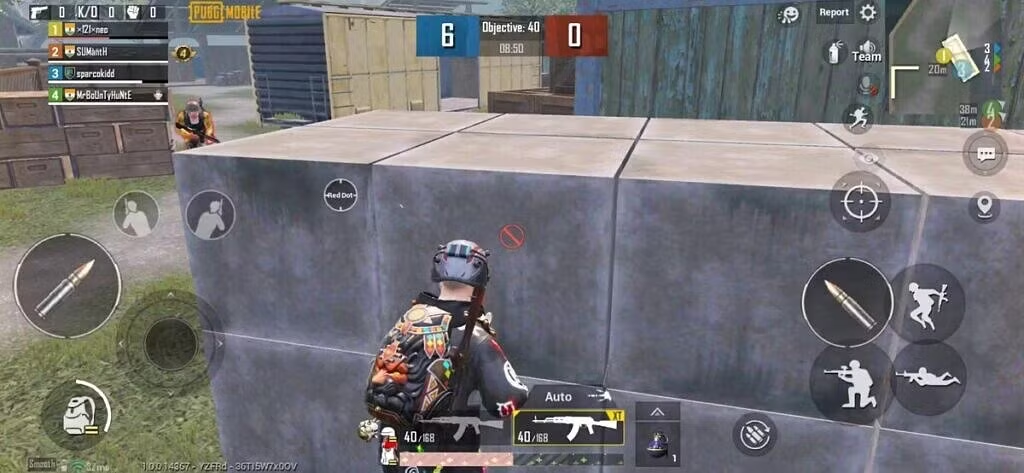
Normal Phone View
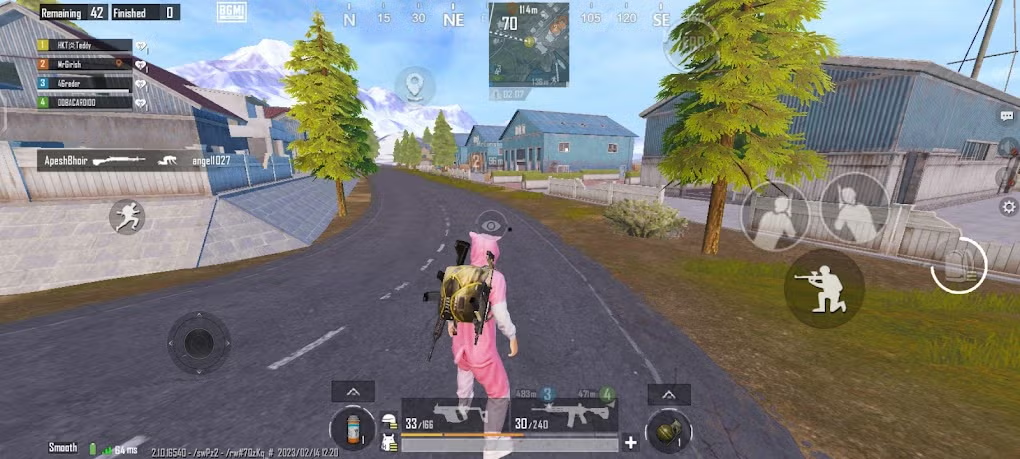
iPad View
Follow these steps to enable custom iPad View with floating seekbar:
Start Shizuku Service
Launch Shizuku and start the service using ADB
ADB Wireless:
adb shell sh /sdcard/Android/data/moe.shizuku.privileged.api/start.sh
Verify Shizuku is running (check notification)
Open GFXTOOY
Launch GFXTOOY and grant Shizuku permissions when prompted
Select your game version (Global, BGMI, KR/JP, etc.)
Scroll to Custom iPad View
Navigate to the "Custom iPad View" section in GFXTOOY
Toggle ON the "Show Floating Seekbar" option
Grant Floating Window Permission
GFXTOOY will request permission to display over other apps
Important: Grant this permission to see the floating seekbar
Launch Game
Start PUBG Mobile / BGMI from GFXTOOY
You should see a floating seekbar on your screen
Adjust Screen Resolution
Use the floating seekbar to choose your preferred screen resolution in-game
Method: Drag the seekbar left/right to change resolution
What is the Floating Seekbar Overlay?
The floating seekbar is an overlay window managed by FloatingWindowService that appears on top of the running game. You can interact with it without switching apps.
In-Game Access
Adjust settings while the game is running — no need to alt-tab or minimize
Always on Top
The seekbar floats above the game using the SYSTEM_ALERT_WINDOW overlay permission
Easy Toggle
Enable or disable the seekbar overlay with a single switch in GFXTOOY
How the Seekbar Overlay Works
- User enables the seekbar toggle in GFXTOOY
- GFXTOOY validates Shizuku is running and overlay permission is granted
FloatingWindowServicestarts as a foreground service- The seekbar window is added via
WindowManagerusingTYPE_APPLICATION_OVERLAY - The seekbar remains visible above PUBG Mobile while you play
- Shizuku installed & running
- "Display over other apps" permission granted
- Android 8.0+ (SYSTEM_ALERT_WINDOW)
- No root required
- Works on all Android devices
Recommended Resolution Settings
| Seekbar Position | Resolution | Aspect Ratio | Best For | Visibility |
|---|---|---|---|---|
| Far Left | 1280×720 | 16:9 | Performance | Normal |
| Center | 1728×1080 | 16:10 | Balanced | Good |
| Right | 1920×1200 | 16:10 | iPad View | Excellent |
| Far Right | 2048×1152 | 16:9 | Ultra Wide | Best |
- Start at center position and adjust based on your preference
- For competitive play: Use right side for maximum visibility
- For casual play: Use center for balanced experience
- If game lags: Move seekbar slightly left
- Hide seekbar when not needed by minimizing it
Troubleshooting Common Issues
- Check if Shizuku is running properly
- Grant "Display over other apps" permission for GFXTOOY
- Restart GFXTOOY and enable floating seekbar again
- Check notification for any permission requests
- Make sure you selected the correct game version in GFXTOOY
- Try different resolution settings using the seekbar
- Restart game after changing resolution
- Update GFXTOOY to the latest version
- Lower the resolution using seekbar (move left)
- Close background applications
- Reduce in-game graphics settings
- Restart your device
- Use "Smooth" graphics preset in PUBG settings
Best Practices for iPad View
- Use 1920×1200 resolution
- Keep seekbar on right side
- Use "Smooth" graphics for max FPS
- Disable shadows and anti-aliasing
- Practice with new FOV in training mode
- Use 1728×1080 resolution
- Keep seekbar at center
- Use "Balanced" graphics for good visuals
- Enable anti-aliasing for smoother edges
- Adjust brightness for better visibility
iPad View vs Normal View
| Aspect | Normal View | iPad View | Advantage |
|---|---|---|---|
| Field of View | 70–80 degrees | 90–100 degrees | +30% more visibility |
| Enemy Spotting | Average | Excellent | See enemies sooner |
| Peripheral Vision | Limited | Wide | Better awareness |
| Competitive Edge | Basic | Significant | Level playing field |
Get iPad View Today!
Experience PUBG Mobile with iPad-like wide screen on your Android device
Ready for the Ultimate Advantage?
Join thousands of players using iPad View for competitive edge